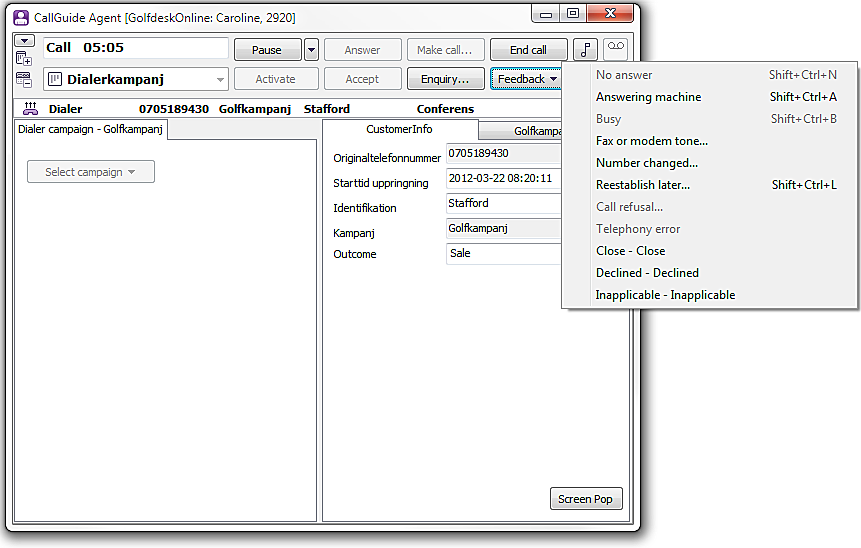
When working with a campaign contact you have a list with available feedbacks. The list opened with the Feedback button or with F11.
If there is a call in progress when the feedback is registered, the call is ended automatically. This is done in order to facilitate and speed up the work with feedback alternatives such as No answer or Answering machine.
Feedback names followed by an ellipsis ... open a support area. Fill in the additional information and end with OK. All other feedback options have direct impact, meaning that the selected feedback is given immediately and if there is a call in progress, it will be hung up immediately.
You cannot give feedback if you, after an enquiry, have had a preview campaign call transferred to you. This kind of call is classified as an enquiry contact and not a campaign contact. For dialer campaigns, enquiry can be made but transfer is not possible.
The existing feedbacks (in alphabetical order) are:
Closed – bought 10.
This will always change the last called telephone number, irrespective of ithere are one or more telephone numbers added for the campaign records. In this situation, the agent can leave the telephone number fiel empty as well. If the record then contains more than one telephone number, the next number in line will be used the next time. If the removed number is locked, or if after the removal there are no telephone numbers left to call, the record is automatically closed with the System loss - Ruled feedback.
If you cannot apply a feedback, the feedback option is greyed.
If there is a call in progress when the feedback is registered, the call is ended automatically. Most feedbacks are executed as soon as you have selected feedback in the menu.
You can use shortcut commands for four of the feedback options; combinations of the Ctrl Shift keys together with a letter key.
For feedbacks needing extra information, such as Reestablish later, Number changed, or Declined, new windows are opened. Feedback is then executed only when you have entered the required information, i.e. the call is not ended directly when you select the feedback in the drop-down menu but only when you have clicked on the OK button in the extra window that was opened.
For feedback Reestablish later the Feedback – Reestablish later window is opened, where you i.a. enter a time when the customer is to be contacted again. You can choose whether the call is to be made by any agent or if you want to call the customer back yourself. You do this by ticking or unticking the Reestablish Personally box.
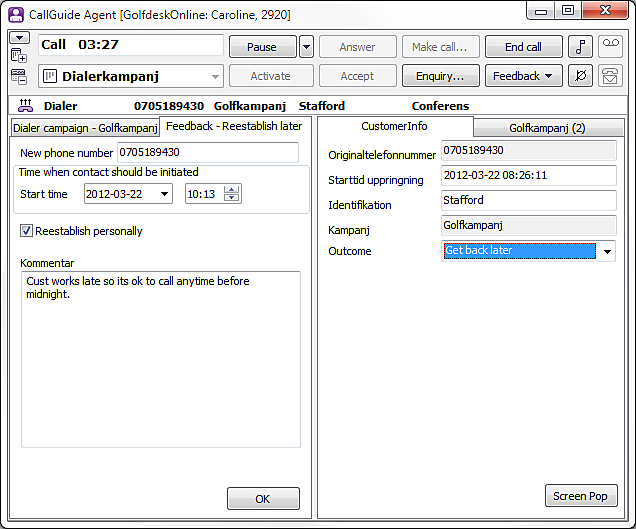
For feedbacks such as Declined, and Fax or modem tone you also have the option of calling back at a later occasion. These extra feedback windows have, in addition to comments fields, also a field where you can enter a new/changed telephone number.
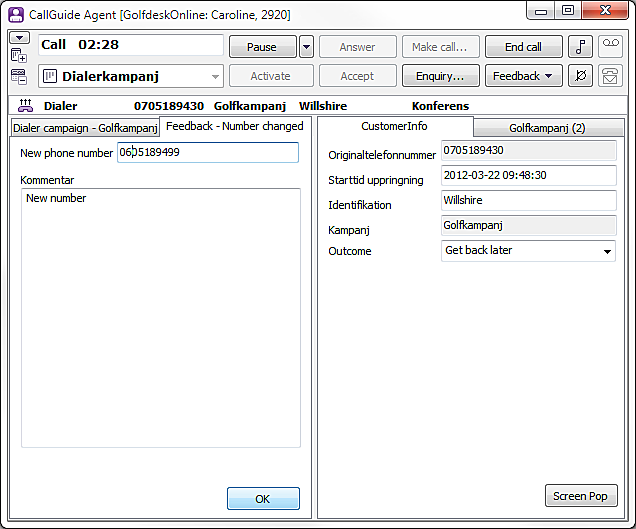
The feed-back windows for campaign, where you may enter a telephone number to call later do not serve the same purpose as Schedule new contact. The Schedule new contact function, used in all other contexts than campaign, creates a new record in the form of a callback record.